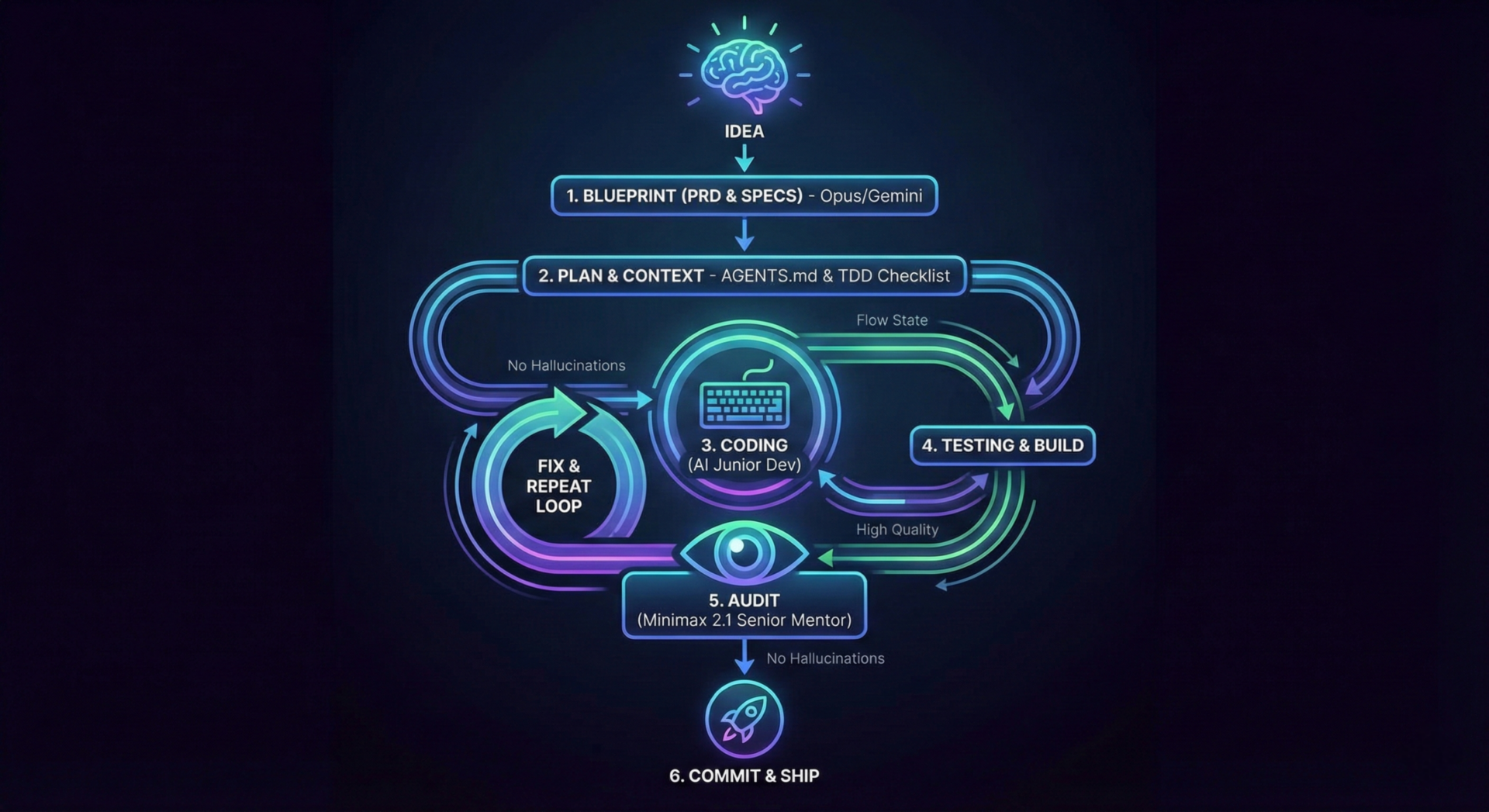
My vibe coding process is not just about typing speed. It is about maintaining a continuous flow state where the AI handles the heavy architectural lifting and implementation details while you act as the conductor. Over time I have refined a specific workflow that keeps code quality high and hallucinations low.
If you have already read my post on setting up your AI environment you know that tools are only half the battle. Here is my end-to-end vibe coding process for building software with AI from the first prompt to the final commit.
Phase 1 of the Vibe Coding Process: The Blueprint (PRD)
Every successful session starts with a solid foundation. I spend the initial energy creating a comprehensive Product Requirement Document (PRD). If you skip this you will spend hours fixing logic errors later.
For this high-level architectural work I rely on Opus 4.5. I ideally use it in the
|
1 |
claude code |
CLI plan mode as it has the reasoning depth required to see the big picture. As alternatives Gemini 3 Pro or Opus 4.5 inside Antigravity are excellent. The Codex CLI with the GPT 5.2 model is also a strong contender.
Phase 2: Specifics and Planning
Once the PRD is written to disk I never let the AI rush straight into coding. The context window gets too messy. Instead I ask it to create a single SPEC file for each individual component. For example if the project has a REST API and a React Vite frontend they get separate spec files. This forces the model to focus on one domain at a time.
With the SPECs ready I ask for a detailed Implementation PLAN for each component. I am very strict here. I explicitly instruct the AI to:
- Research the latest stable versions of packages so there are no hallucinated libraries.
- Design with TDD (Test Driven Development) in mind.
- Ensure the plan includes all linting, build steps and test passes.
- Add
checkboxes to all Milestones and Tasks.1[ ]
This creates a checklist that we will mark with
|
1 |
[x] |
as we progress which gives us a clear sense of momentum.
Phase 3: Contextualizing the AI
Before writing code the AI needs to understand who it is and what it is working on. I run an /init prompt to generate an
|
1 |
AGENTS.md |
file based on the current codebase structure.
This prompt is natively available in OpenCode and Codex but is not always present in Antigravity. You can find the prompt source here:
https://raw.githubusercontent.com/dlukt/ai.md/refs/heads/main/prompts/init.md
Once all these markdown files including PRD, SPECs, PLANs and AGENTS are created I run
|
1 |
git init |
and commit everything. This baseline is our safety net.
Phase 4: The God-Tier Auditor (Minimax 2.1)
This is the secret sauce of my vibe coding process. Code written by AI is usually incomplete or has not considered all angles. If an experienced human would write the code it would take a very long time. Because of that slowness the human has time to think and considers many possibilities. But even then the human might miss things.
AI is a lot faster but maybe also because of the speed it does not get to think deeply and makes mistakes as well. You should treat an AI coder like a junior developer (even if that is not really true) and the auditor step acts as a senior mentor that then reviews the output the junior coder has created.
I have found that Minimax 2.1 running in OpenCode acts as that god-tier reviewer. It spots logic gaps, security flaws and architectural inconsistencies that Opus 4.5 and Gemini often miss. Plus Minimax 2.1 is currently free in OpenCode.
Setting up the /audit command
I have automated this by adding a custom command in OpenCode. You can do this by creating a file at
|
1 |
~/.config/opencode/command/audit.md |
with the following header and content:
|
1 2 3 4 |
--- description: Audit uncommited code changes agent: build --- |
Then copy the prompt text from here: Auditor Prompt.
Now whenever I have uncommitted changes I simply run
|
1 |
/audit |
. It reads the diff and tears it apart before I commit.
Note: If you are using Google Antigravity you can add this as a global workflow by placing the markdown file in your
|
1 |
~/.gemini/antigravity/global_workflows/ |
directory.
Phase 5: Execution
With the environment set and the auditor ready the workflow becomes simple:
- Pick the first milestone from the PLAN file. This is usually setting up the repo.
- Ask the AI to implement it.
- Run the tests.
- Run /audit to catch issues, then fix the issues and /audit again and fix until it’s without any issues. Note that you should do this fixing inside the same chat session where you did the implementation so the context is preserved.
- Commit and mark the task
.1[x]
Summary of the Vibe Coding Process
To recap here is the path to success:
- Planning: Use Opus 4.5 or Gemini 3 Pro to write a PRD and separate SPECs.
- Roadmap: Generate a TDD-focused Implementation PLAN with check-boxes.
- Setup: Run /init to create AGENTS.md and git commit everything.
- Coding: Implement one milestone at a time.
- Reviewing: Use Minimax 2.1 with the /audit command to act as the Senior Mentor.
- Refining: Loop the audit and fix process in the same chat until clean.
This workflow transforms coding from a chaotic struggle into a structured and high-speed assembly line. By separating the roles you get the best of both worlds.
#AI #ArtificialIntelligence #SoftwareDevelopment #Coding #Programmer #TechTrends #LLM #GenerativeAI #DeveloperLife #BuildInPublic